

Scaling Applications in the Cloud
- nikolaos giannakoulis

- Nov 8, 2022
- 12 min read
Introduction
Scalability is an important part when architecting a web app. There are multiple options on how to scale the web app tier and the database tier. Those options will be explained with examples from services from Microsoft Azure. If you are beginner and want to understand the fundamentals of scalability and resiliency, then this article is for you.
1. Scaling the web app
Let’s imagine you have a business web app hosted on a VM. At first, your website gets some ten requests per second. But now, after you launched a new cool product or service, it is getting multiple thousands of requests per second. The VM will receive all the load, in certain point it will reject requests and become slow if not down, that is bad news for your growing business! How to solve it? You might say: I need a more powerful VM! Well, that is called Vertical scaling.
a. Scale Up (Vertical scaling)
When the 8GB RAM, I3 processor and HDD disk are not enough anymore, then you spin up another VM. The new one have 512 GB RAM, Xeon processor and the latest SSD disk. This is Scale Up. It is the easiest and fastest way to scale a web app. It requires only moving the web app content to the bigger new VM, without changing the source code. Azure provides VMs up to 448GB dedicated RAM.

When moving to another VM, the app might be down for a certain time and might lose user’s HTTP sessions and Cookies.
If even with this monster VM, the app cannot handle all the load, then Scale Up reaches its limits because VMs at the end cannot have unlimited RAM and CPU. So, what is if we can share the load on multiple VM instances? Well, that is Scale Out.
b. Scale Out (Horizontal scaling)
While Scale Up focuses on making the single machine bigger, Scale Out is creating multiple ones. This way we can have much more RAM and CPU, not on one single VM, but on a cluster of VMs. The same solution used to get more computation power with processors, when moved from one single to multiple processors/threads.
Scale Out requires re-thinking about the architecture of the app and in some scenarios changing the source code.

This approach needs a solution to choose to which VM instance to send the user or HTTP request to. Well, that is the Load Balancer or the Traffic Manager.
c. Load Balancer, Traffic Manager
As the meaning of their names, Load Balancer and Traffic Manger are used to distribute network traffic load between multiple instances so that no one will fail.
They use multiple algorithms, these are some of them:
Round Robin: rotating sequential manner.
Least Connection: the current request goes to the server that is servicing the least number of active sessions at the current time.
Chained Failover: redirects to the next server only if the previous one cannot accept any further requests.
Weighted Response Time: redirects to the server with the current fastest response.

With this solution, you can go to up to 20 VM instances in Azure. But what if the request takes too long because it tries to access images, videos, Html or any static content on a server that is too far away from the user? The solution here is to use CDN.
d. Content Delivery Network (CDN)
CDN is used to reduce the latency for getting static content from the server to the user’s location. This latency is mainly caused by 2 reasons. The first reason is the physical distance between the user and the server. CDNs are located in multiple locations called Point-of-Presence (POP) around the world. So that it is possible to get one that is closer to the user location than your servers are. The second is accessing the file on the disk, so CDN might use a combination of HDD, SSD or even RAM to cache these data, depending on the frequency of data access frequency. A time-to-live (TTL) can be applied to the cache to say it should expire at a certain time.
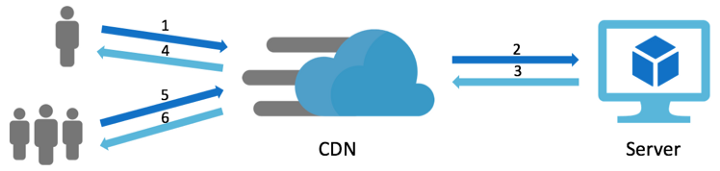
CDN caches static content files. But, what if you need to cache some dynamic data? This can be solved by using Cache.
e. Cache
When lots of SQL requests to the database gives the same result, then it is better to cache this data in memory to ensure faster data access and reduce the load on the database. The typical case is the top 10 products displayed on the home page for all users. Because it uses RAM memory and not disks, it can save as much data as the RAM do. Data is stored as key-value pairs. Cache can be distributed across multiple regions.
Azure Redis Cache can save up to 530 GB. Azure doesn’t provide a service for Memcached.
In case of underlying infrastructure issues there can be potential data loss. Redis Cache provide a solution for data persistence, while MemCached doesn’t.
When users search for a certain information in the web site, a request will hit the server to get the data from the database. Most requests are similar in their form. So why not caching those results? Well, here where ElasticSearch comes to play.
f. Elasticsearch
Elasticsearch can be used to store a predefined search queries and their results. Because it saves data in-memory, it is so much faster than querying the data from database. It also can provide a near real-time search-as-you-type suggestions. This reduces the load on the database, which itself reduces the load on the server as the request will be processed in less time. ElasticSearch is accessible via REST API and requires changing the app’s source code to use it.
Elasticsearch could also be used for log analytics and real-time application monitoring.
When creating multiple copies of the server hosting the hole monolith web application is still not enough or not efficient to handle all users, then let’s think about splitting the application into two parts: web app and web API.
g. Separate Web App/frontend and Web API/backend
Monolith web apps are typically composed of 2 tiers: Web API and frontend web app. This is the case for ASP.NET MVC apps where the views and business logic live together in one server. In this case, the server will not only process the request to get data to the user but it also renders web pages to generate HTML content. The second role could be done by the client using SPA (Single Page Application) approach. So, the Views part of the app will be moved on a separate server. Consequently, two servers instead of one are now serving users.
This approach requires rewriting the app.
Splitting the application into 2 parts is not enough? What about splitting it into multiple parts? Well, this is where microservices comes to play.
h. Microservices & Containers
Microservices are an approach to developing a single application as a suite of small services, instead of one single giant app. Each small service runs in its own process, instead of relying on one single process to run the entire app. The typical example is the e-commerce app split into microservice for payment, one for front end user interface, one for email notifications, one for managing comments and another one for recommendations.
Think about it as applying the separation of concerns and the single responsibility principle in OOP not only to the class level but also to the different components.
With this way, it is possible to scale out only and exactly the specific part of the application that receives more load. So, you can have 5 instances running the front end microservice and 2 instances running the payment microservice.
These microservices communicate with lightweight mechanisms, often an HTTP resource API. Because they are small parts, they don’t need the entire VM instance to run. Instead, they can run on a Container. A container is another form of OS virtualisation. Unlike the VM, it just has the minimum resources needed to run the app. This results in a light weight image. Hence, it is more scalable than VMs.
Those multiple containers can be managed by an orchestrator like Kubernetes or Swarm.

Going from monolithic to microservices requires lots of change in the app source code. It is not unusual to be required to rewrite the entire app from scratch.
Azure supports Docker containers and also container orchestrators like Kubernetes, Service Fabric and Swarm. Learn more about AKS.
With microservices, the monolithic app is split into small pieces based on business domains. Can we go deeper more than that to split the app to smaller pieces? Well, Serverless apps makes it possible.
i. Azure Functions (Serverless app)
Serverless app is a small piece of the app hosted on its own instance. This instance is managed for you, so you don’t need to take care of any container or VM. It can scale out automatically depending on the load. Typically, you can use it for resizing or processing images, starting a job on a database etc., anything that is more often independent from the business logic.
Now that we have many tiers running, each one on a different endpoint, the client app will ask: where do I go? Well, API Management is designed to help in this case.
j. Azure API Management
As Load Balancer distributes load on VMs, API Management can distribute load on different API endpoints or microservices. The distribution mechanism can take into account the load on each endpoint.

We split the monolith app into multiple small modules. These modules need to communicate with each other. They obviously can use REST web services. Some of these communications doesn’t need to be synchronous. So why keep waiting for a response if it is not needed right now! Well, here Queues comes to play.
k. Azure Queue Storage
Queues provides an asynchronous solution to communication between software components. When using REST web services for communication, the requested server must be available at that time or the app will fail. While with Queues, if the server is not available, then it doesn’t matter. The request can wait in the Queue to be processed when the server will be available later. This approach help to decouple the different components and makes them easily scalable and resilient.
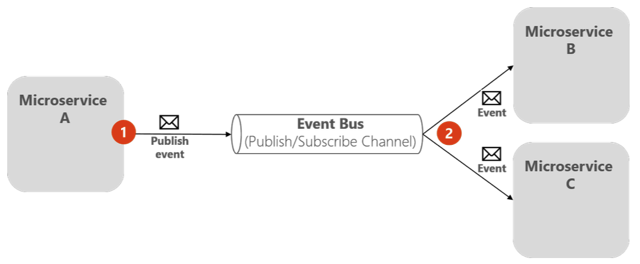
There are some other techniques to reduce the load on the server which doesn’t need using cloud services. Other than the server, who else can do data processing? Well, the front-end website might be a good candidate in some scenarios.
l. Pushing tasks to the client side
Many tasks could be processed without the need for the database or the server. For example, if the front-end web site can resize images instantly and effectively, then why bothering the server? For several years ago, the server always tried to do all the heavy work for the client because the latter is not powerful enough. This fact has changed now: 4GB Ram with 8 cores processor is not a surprising spec for a mobile device.
Another solution to not bother the server is to not send the same request more than once if we are sure we’ll get the same response! Well, caching the HTTP responses on the client is a good practice.
m. Caching repeatable HTTP requests and responses
The browser can intelligently cache the HTTP requests and their responses if the web app wants to. In addition to that it can provide a TTL (Time-To-Live) for each stored data. This way the web app will reach the server only for the first time, then the next time it will get the response from the cache. This not only reduces the load on the server, but also makes the client app more responsive. This approach is relatively easy to be implemented as it only requires adding HTTP Headers to the requests. The browser will interpret those and take the responsibility to either return data from its own cache or routing the request to the server.
Until now, we have explained the options for scaling a web app. But, almost all apps connect to a database server. When the app gets more load, it typically affects the database. Like the web app, the database cannot receive infinite requests/queries per second. Not only that, the SQL database instance have a maximum amount of data to save. Hence, it needs to scale. So how to scale a database?
2. Scaling the database
Most of the principles we used for scaling a web app are applied for scaling a database. Those are all about vertical and horizontal scaling, caching and replicates. We’ll explain them one by one and start with the easiest option to the more complex.
The easiest option to enhance database response time is to use a built-in feature added to do exactly that. Well, I’m talking about caching data.
a. Cache data queries
SQL databases have a good feature for caching data: buffer cache. It allows caching the most frequent queries in-memory. As a result, access to data is faster.
Caching queries is limited by the size of the available memory. And when lots of queries cannot benefit from the cache and needs to query the big tables, then we need an option to retrieve data as fast as possible. Well, indexes are made for that!
b. Database index
Relying on the ID to retrieve data from the tables requires looping through almost all the rows. That is because the ID is a non-ordered primary key. The customer with ID equal to 5 could be on the row number 7. With using index, it’ll be on the 5th row. As a result, there’s no need to loop the entire table if we know where exactly we can find it.
Even with indexes, you might still below the required response time. The cause might be non-optimized SQL queries. Well, we need to optimize the queries!
c. Stored Procedures over/and/or ORM
Performance testing reveals that Stored Procedures are faster than queries coming from source code or ORM because they are pre-compiled in the database. There’s a tradeoff here as in the other hand ORM are easier to deal with, can handle multiple databases and even can optimize the SQL query. Nothing keeps us from mixing both to get the best out from the two.
If the limits of a one single database are reached, then why not creating multiple instances. The duplication of can be based on multiple criteria. Well, let’s start by the one based on Read or Read-Write operations.
d. Replicate database (RW/R)
SQL queries are either reading or writing data. From here, engineers asked: why not to write to a database and read from another one? This way they can reduce the load to a half by balancing it on 2 databases instead of only one. The RW DB will take the responsibility to update the Read DB so that they have almost the same exact data.
With the web app, when we wanted to go further more than duplicating instances, we split the app into small components. Can the same logic be applied to database? Another criterion for replicating DB is based on splitting the table itself. This is called Partitioning or Sharding. Well, let’s start by Partitioning.
e. Split vertically (Partitioning)
Partitioning divides a table into multiple tables with fewer columns. The customer table with 20 columns will be split into 2 or more tables. The first table will have columns from 1 to 7 and the second one will have the columns from 8 to 20. Of course, each table contains the primary-key to join data from both tables. This is useful when usually only the first 7 columns are needed. So, it takes less time run as it’ll bring less data. Those 2 tables could be on the same database or in 2 separate ones. SQL databases support this case by providing features to recognize from which partition to get the data.

Vertical partitioning should be considered carefully, because analysing data from multiple partitions requires queries that join the tables. That is the case where we need all the 20 columns.
We split a table vertically by splitting the columns. Can we split it based on the rows? Well, that is called Sharding.
f. Split horizontally (Sharding)
Sharding divides a table into multiple tables. Each table then contains the same number of columns, but fewer rows. For example, the customer table can be partitioned to 5 smaller tables each representing the continent for a group of customers. Knowing the customer location will help to redirect the query to right partition to process less rows. The smaller tables can live in the same SQL instance or in separate ones, the same as with Partitioning. Horizontal and Vertical partitioning can be mixed together.

Tables should be partitioned so that queries reference as few tables as possible. Otherwise, excessive UNION queries, used to merge the tables logically at query time, can affect performance.
Until now, we have seen splitting tables based on their columns’ or rows’. But, can we split tables into group of tables? Well, let’s see DDD.
g. Domain Drive Design (DDD)
We have split the web app into smaller microservices based on the context/domain. The same thing could be applied to DDD. So that each domain has its own set of tables: tables for payment, comments, etc.
Imagine that now each microservice have its own domain tables living in the same container!
The objective of DDD is not to scale the database. But that is a consequence of its application. And if it is not built from the design phase of the project, it will require a huge amount of change to the source code.
Still, the SQL databases are not enough for handling all the load? Well, why not trying NoSQL?
h. Azure Cosmos DB and Azure Tables (NoSql database)
SQL databases are based on schema and relationships between tables. This is at the heart of its limit to reach infinite scalability. On the other side, NoSQL databases save data as key-value pairs, no need for schema neither for table relationships. For that reason, tables can be split horizontally and infinitely!
NoSQL eliminates relationships between tables. You still can do some tweaks to establish relationships, but that is not recommended. So, you have better to make the decision if it still suits your needs or not.
Conclusion
Scaling an application on the cloud is not only the responsibility of the architect, but it also requires the developers to think about the stateless aspect and DBA to think about partitioning the database. This work should be done at first. One important note to think about is also Metrics and Analytics. Because those who can tell if we need to scale up or down and especially what exactly needs to be scaled.


Comments